How to Spot a GCash or Maya Phishing Text in 2026: A Field Guide for Filipinos
Why do fake GCash and Maya texts still work in 2026?
Because they look like they came from the right place. In August 2025, the CICC warned about scam texts that impersonate banks and e-wallets “like GCash and Maya,” some of them inserted into legitimate SMS threads (PIA).
Some of it is hardware. In October 2025, the PNP Anti-Cybercrime Group arrested two men and seized four IMSI catchers and text blasters after vehicles were seen roaming Makati, BGC and the Mall of Asia area, allegedly sending smishing links (GMA News). In September 2026, the NBI caught a foreign national in Cavite with a vehicle-mounted IMSI catcher, a device the NBI says mimics cell towers and sends text blasts (GMA News).
The CICC’s complaint center logged 18,633 complaints in 2025, and losses from consumer fraud, online fraud, hacking and phishing reached ₱418.187 million (GMA News). Abroad it’s the same story: the US Federal Trade Commission says reported losses to scams that started with a text hit $470 million in 2024, five times the 2020 figure (FTC).
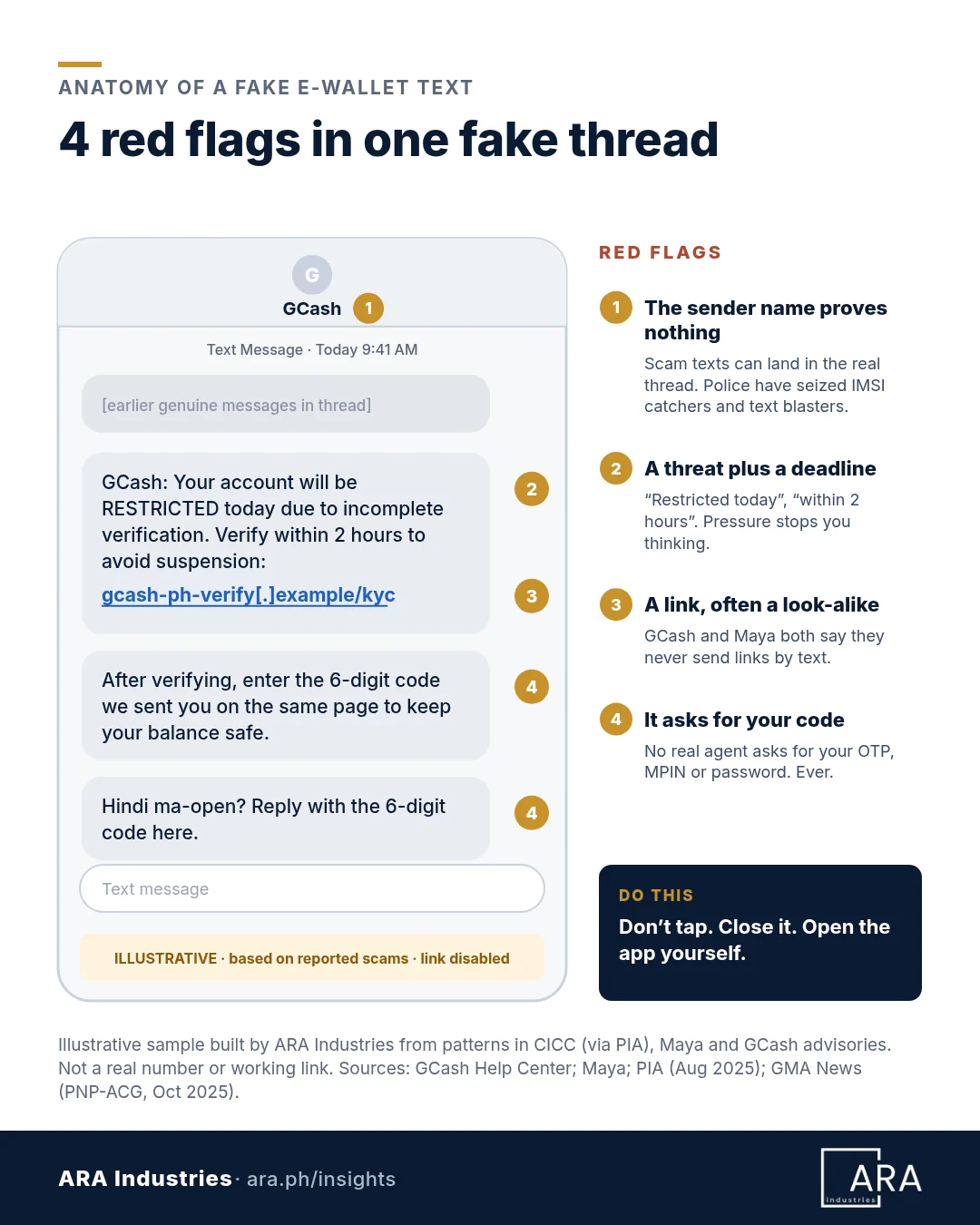
The lesson: the sender name proves nothing. What the message asks for gives it away.
How do GCash and Maya actually contact you?
If a text breaks one of these rules, it isn’t them.
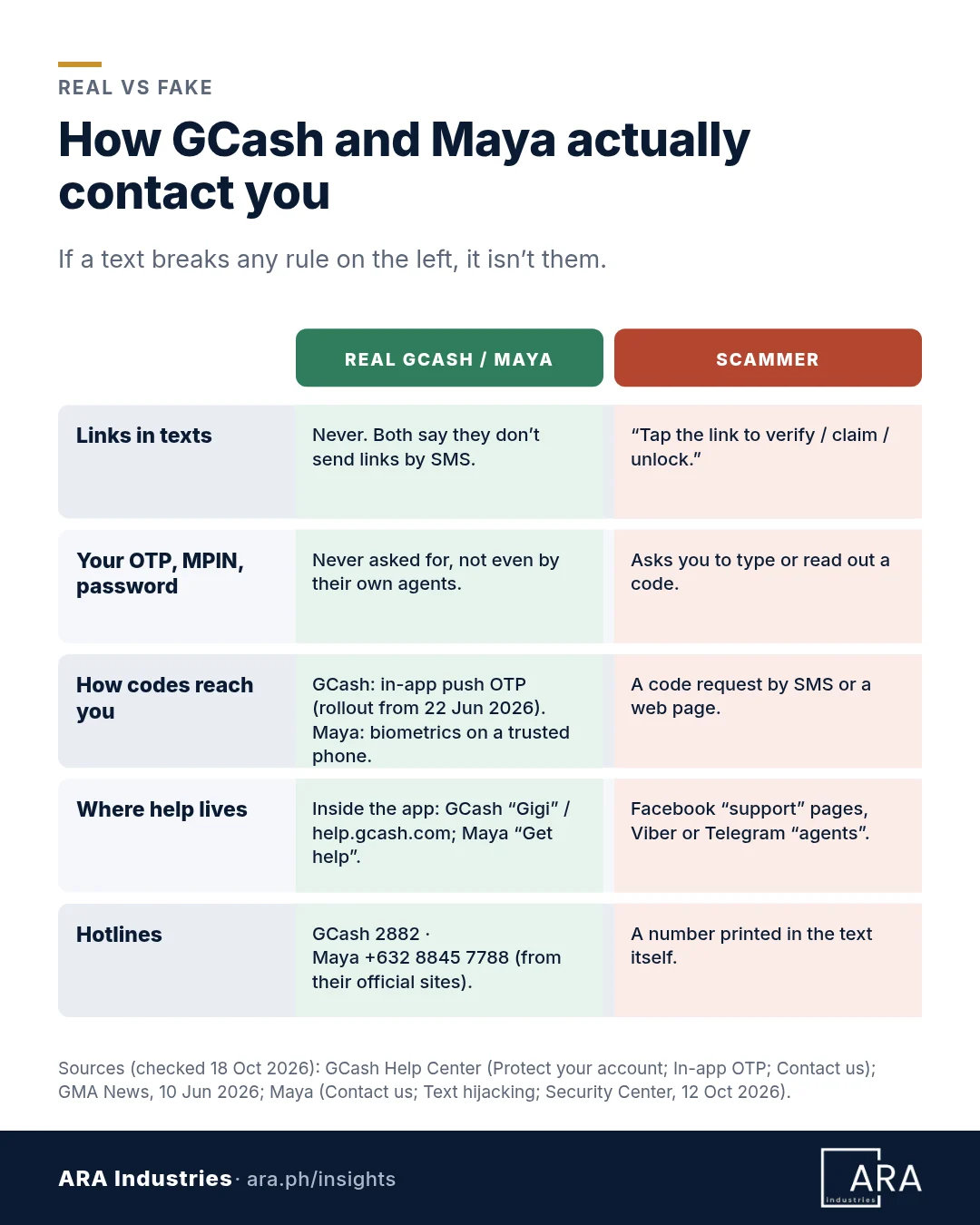
- GCash “will NEVER send you links via SMS/email or ask for your MPIN/OTP.” Official help lives in the app or at help.gcash.com (GCash Help Center).
- Maya “will NEVER send you links or ask for your app password, OTP, or other sensitive information over text or any other channels” (Maya). Its advice: never share your password, OTP, card number or CVV “with anyone, even our representatives” (Maya).
- Telcos say the same. “If you receive a text message with a link, it did not come from Globe” (Globe). The CICC says the NTC has prohibited links in companies’ broadcast texts (PIA).
- So does the regulator. BSP Circular 1213 bars supervised institutions from sending clickable links or QR codes by SMS, email or chat unless you prompted it, the link only gives information, or it doesn’t lead to a page asking for your login or sensitive details (BSP AFASA booklet).
Why a text asking for your GCash OTP is now even more suspicious
GCash began moving its one-time PINs from SMS to in-app push notifications on 22 June 2026, part of a wider industry move away from SMS OTPs that GCash links to BSP guidance (GMA News). Its Help Center says all users will soon get in-app OTPs, though partner codes such as BPI’s may still come by SMS (GCash Help Center). Maya lets upgraded users approve Send Money with Face ID or fingerprint on a trusted phone instead of an SMS OTP (Maya). No real message will ask you to type a code into a website or reply with it.
What does a fake GCash or Maya text look like?
A reconstructed thread. Illustrative, based on reported scams: the link is disabled and no real number is shown.
Patterns in official advisories right now:
- “Your account will be restricted.” Maya describes hijacked texts carrying “distressing alerts such as your account being compromised” before asking you to click a link and “verify” (Maya).
- Fake aid “claimable” online. In April 2026, GCash warned about texts that appear to come from DSWD asking people to claim an “e-fuel voucher” through a phishing link. DSWD confirmed these are scams (GCash).
- “Someone is registering a phone to your account.” If you get a GCash OTP you didn’t request, GCash says ignore it, don’t share it and change your MPIN. If you get a phone-registration or “Account Secure” text you didn’t ask for, file a report (GCash Help Center).
How do you spot a phishing text in 10 seconds?
Five red flags. One is enough.
- A link or QR code. GCash and Maya say they don’t text links.
- A request for your OTP, MPIN, password or card details.
- A threat or deadline: “today,” “within 2 hours,” “or your account will be suspended.”
- A prize, refund or aid you didn’t apply for.
- A look-alike web address, or a number to call that you didn’t get from the official app or website.
The 10-second self-check
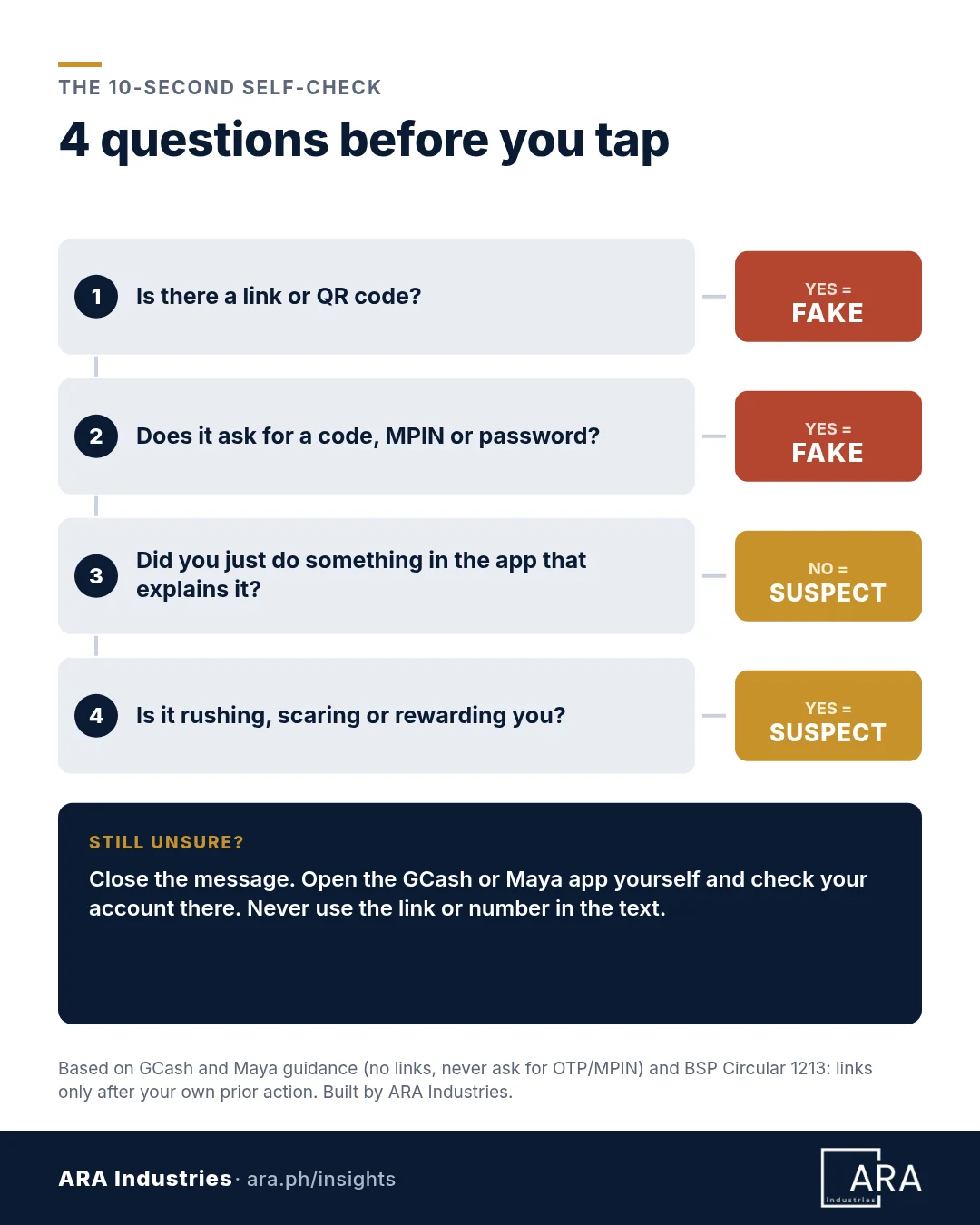
- Link or QR code? Fake.
- Asks for a code, MPIN or password? Fake.
- Nothing you just did in the app explains it? Suspect.
- Rushing, scaring or rewarding you? Suspect.
- Still unsure? Close it and open the GCash or Maya app yourself.
Clicked a link or shared a code? What should you do in the first 10 minutes?
Move fast. The BSP’s AFASA rules say account owners should report disputed transactions immediately, and let providers hold disputed funds while they verify (BSP Circular 1215).
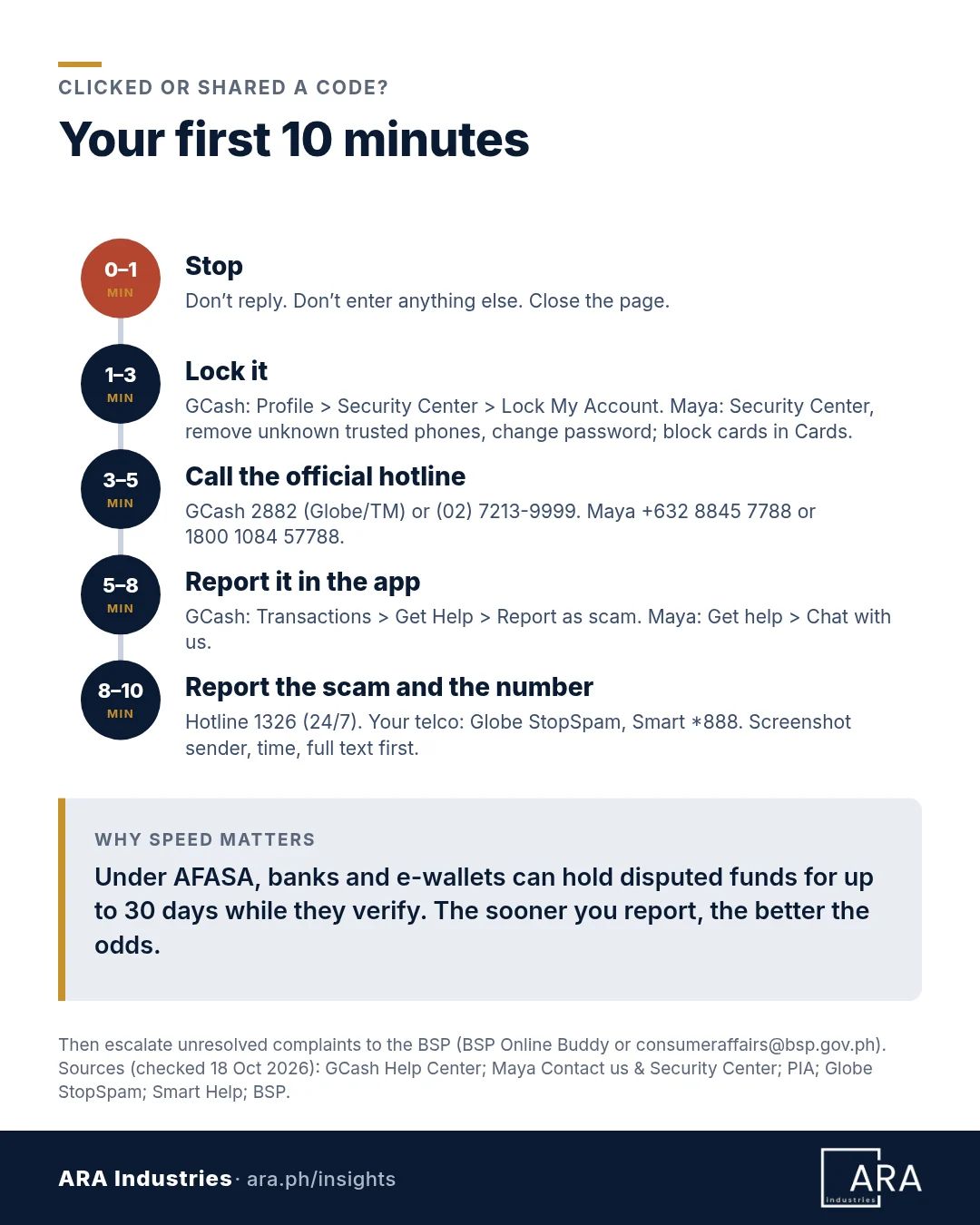
- Minute 0–1: Stop. Don’t reply, don’t type anything else, and close the page.
- Minute 1–3: Lock it. GCash: Profile › Security Center › Lock My Account, or tap Lock My Account on the login page, then verify with Gigi (GCash Help Center). Maya: open Security Center from Profile or Services, remove trusted phones you don’t recognize, check Login History and change your password (Maya). Block your Maya card under Cards (Maya).
- Minute 3–5: Call the official hotline. GCash: 2882 (toll-free for Globe and TM) or (02) 7213-9999 from a Globe landline, with 24/7 support for scams and unauthorized transactions (GCash). Maya: +632 8845 7788, 1800 1084 57788 toll-free, or *788 free on Smart; it takes after-hours calls for suspected unauthorized transactions (Maya).
- Minute 5–8: Report it in the app. GCash: Transactions › select it › Get Help › Report as scam. GCash says it will reach out within 24 hours, and that returns aren’t guaranteed (GCash). Transactions you didn’t make must be reported within 15 days through Gigi (GCash). Maya: Get help › Chat with us (Maya).
- Minute 8–10: Report the scam and the number. Call the government’s 24/7 Hotline 1326, which takes reports on deceitful texts and phishing (PIA), or email report@cicc.gov.ph (BSP). Report the sender to your telco: Globe’s StopSpam form or GlobeOne app, or Smart’s verified social pages or *888 (Globe; Smart). Globe also points to the NTC’s text scam report form. First, screenshot the sender number, timestamp and full message (Globe).
Not resolved? Escalate to the BSP through its BSP Online Buddy (BOB) chatbot, or email consumeraffairs@bsp.gov.ph with proof of your earlier complaint (BSP).
What do the SIM Registration Act and AFASA mean for you?
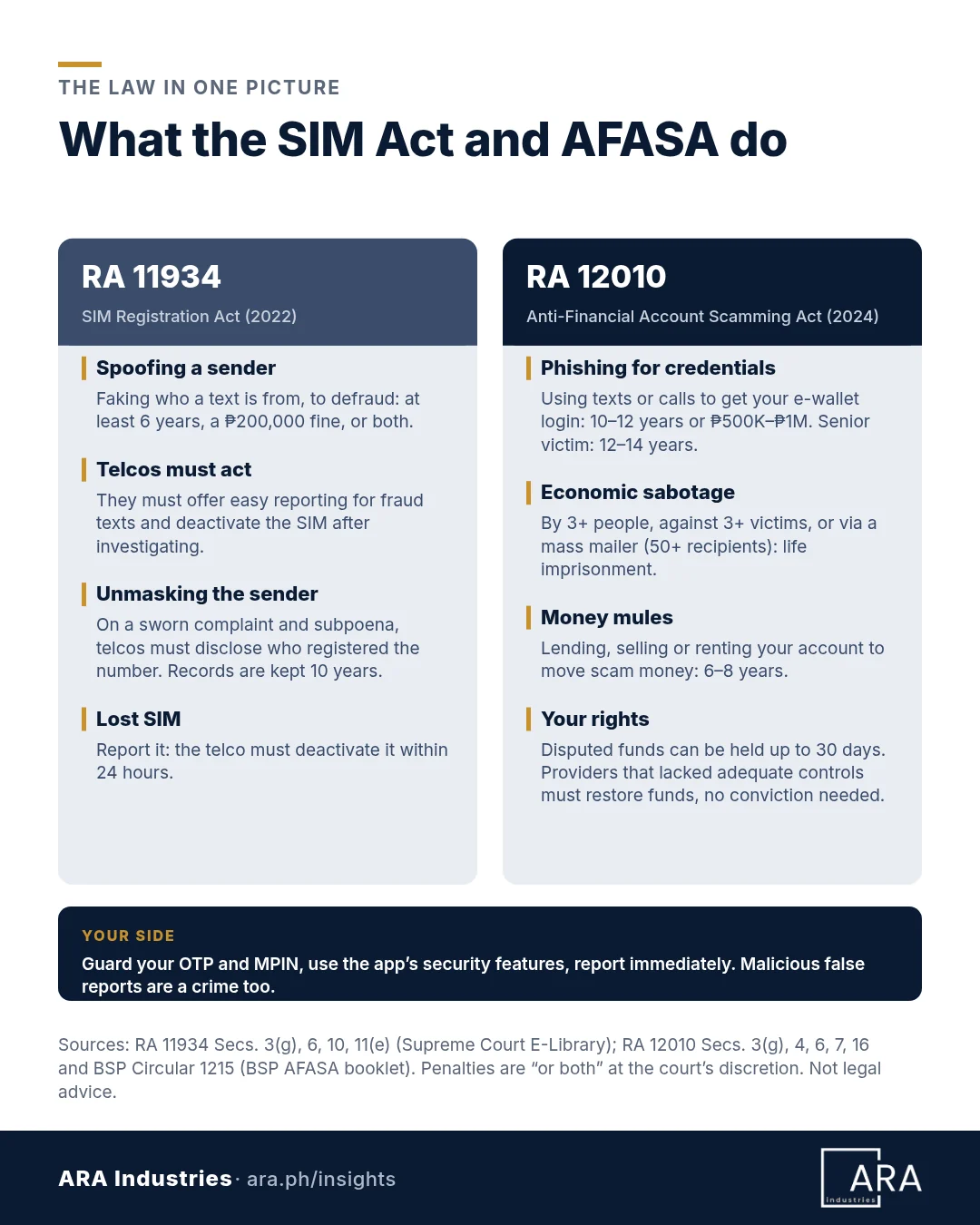
SIM Registration Act (RA 11934)
- Spoofing, sending misleading information about where a call or text comes from in order to defraud, is punishable by at least 6 years in prison, a ₱200,000 fine, or both (Secs. 3(g), 11(e)).
- Telcos must offer user-friendly ways to report fraud texts and calls, and deactivate the SIM used after investigating (Sec. 6).
- On a sworn complaint and a subpoena, telcos must disclose who registered a number used in a crime. They keep the data for 10 years after deactivation (Sec. 10).
Anti-Financial Account Scamming Act (RA 12010)
- Tricking someone out of their e-wallet credentials by text, call or chat, or by posing as a bank or e-wallet, and taking over the account is a social engineering scheme: 10–12 years, a ₱500,000–₱1 million fine, or both. If the victim is a senior citizen: 12–14 years or ₱1–2 million (Secs. 4(b), 16(b)).
- It becomes economic sabotage, punishable by life imprisonment, when done by three or more people, against three or more victims, through human trafficking, or with a “mass mailer” (a service or software that sends to 50 or more recipients) (Secs. 3(g), 4(c), 16(c)).
- Lending, selling or renting out your account to move scam money makes you a money mule: 6–8 years, ₱100,000–₱500,000, or both (Secs. 4(a), 16(a)).
Your rights and your duties
- Banks and e-wallets can hold disputed funds for up to 30 days: up to 5 days at first, extendable by up to 25 (RA 12010 Sec. 7; Circular 1215).
- A provider that failed to use adequate security controls must restore your funds, and no conviction is needed first (Sec. 6).
- Platforms that offer interbank transfers must give you a kill switch and a money lock (Circular 1213). GCash’s versions went live in June 2026 (Mynt).
- Your side: guard your OTP and MPIN, use the security features, report immediately. Malicious false reports are punishable (Sec. 11).
What should you set up this week?
- Turn on GCash push notifications so in-app OTPs reach you (GCash).
- Use GCash Money Lock (Mynt) or Maya Transfer Limits (Maya) to cap what a scammer could move.
- Save the hotlines from the official pages, never from a text.
- Walk your parents and lolo or lola through the 10-second check.
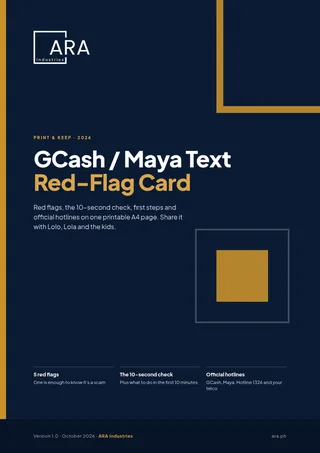
Download the GCash/Maya Text Red-Flag Card (A4 PDF, 1 page): red flags, the 10-second check, first steps and official hotlines on one printable page.
More real examples: phishers using Maya styling in fake “beneficiary enrolled” emails aimed at GoTyme users, and the tricks behind 2025–2026’s crypto heists.
Do you run a business?
Your team gets these texts too, on phones used for company e-wallets and email. ARA Industries runs a fixed-scope cyber health check of your devices, email, backups and admin access, with written recommendations. Book a cyber health check, talk to us, or forward a suspicious text to securenow@ara.ph for a second look.
All hotlines, rules and figures checked against the linked official pages on 18 October 2026. GCash and Maya are trademarks of their owners; ARA Industries isn’t affiliated with either. Not legal advice.
Frequently asked questions
Does GCash send links by text message?
No. GCash says it will never send links via SMS or email, or ask for your MPIN or OTP (GCash Help Center). Treat any “GCash” text with a link as a scam and check inside the app.
Is a text in my real Maya or GCash message thread safe?
Not automatically. Scammers can push messages under a trusted sender name, a trick Maya calls text hijacking (Maya). Judge what the message asks for, not who it seems to be from.
What number do I call if I clicked a GCash or Maya scam link?
GCash: 2882 (toll-free for Globe and TM) or (02) 7213-9999 from a Globe landline (GCash). Maya: +632 8845 7788, 1800 1084 57788 toll-free, or 788 free on Smart (Maya). Then call Hotline 1326.
Can I get my money back under AFASA?
Possibly, not guaranteed. Disputed funds can be held for up to 30 days while providers verify, and a provider without adequate security controls must restore funds, no conviction needed (RA 12010, Secs. 6–7). Report fast.
Where do I report the scammer’s phone number?
To your telco: Globe StopSpam or the GlobeOne app (Globe), or Smart’s verified social pages or 888 (Smart). Telcos must investigate and deactivate fraud SIMs (RA 11934, Sec. 6). Also call Hotline 1326.