Callback Phishing: The Scam Email That Has No Links, Only a Phone Number
This month, a company we support and manage cybersecurity for got an email that looked like it came from inside the building. It was titled "Workstation Security Alert", came from a "noreply" address on the company's own domain, and told the reader to call a US toll-free number within two hours or have their account suspended.
There was no link to click and no file to open. The email even said so, as if that made it safe.
The staff member didn't call. They forwarded it to their IT partner. We flagged it as callback phishing, also called TOAD (telephone-oriented attack delivery), and matched it to a public campaign that uses the same wording, ticket pattern, and US toll-free number. Nobody should dial that number. This post explains how the scam works, how big it has become, and how to make sure your team reacts the same way.
What the email looked like (recreated sample)
Below is a recreation. Names, the domain and the phone number are masked.
From: noreply@[yourcompany].com Subject: Workstation Security Alert – Action Required
Our monitoring system detected unusual activity on your workstation. To avoid suspension of your account, you must contact our Security Desk within 2 hours.
Call: +1 (8XX) XXX-XXXX (toll-free)
For your safety, this email contains no links or attachments.
Regards, IT Security Team [Company Name]
Every line is a red flag. We'll go through them below.
Why a phone number instead of a link?
Email filters are good at scanning links and attachments. A phone number written as plain text gives them almost nothing to block. The real attack starts once you're on the call. A friendly "technician" asks you to install a remote-access tool, read out a one-time code, or "verify" your login. After that they're inside.
Why a +1 number? US toll-free prefixes (800, 833, 844, 855 and so on) are cheap to get through internet calling (VoIP) providers, take minutes to set up, and look like a big, legitimate help desk. A Philippine company's real IT team would normally give you a local landline, a +63 mobile, or an internal extension, not a US 833 number. (That’s our read of the attacker economics, not a published statistic.)
How big is this? The data
In the US
- In 2024, the FBI's Internet Crime Complaint Center (IC3) received 36,002 tech support scam complaints, with losses of about $1.46 billion. (FBI IC3 2024 report)
- Americans aged 60 and over reported $982 million in tech or customer support scam losses in 2024 alone. (IC3 2024; AARP summary)
- The FTC says phone calls were the second most common way scammers made contact in 2024 (284,659 reports, $948 million lost). Victims lost the most per person on calls, with a median loss of $1,500. (FTC Consumer Sentinel Data Book 2024; FTC: Top scams of 2024)
- Email security firm Proofpoint counted an average of 10 million TOAD messages a month, peaking at more than 13 million in August 2023. (Proofpoint 2024 State of the Phish)
- This isn't only a scam on individuals. The group behind the "BazarCall" emails used callback phishing to give Ryuk and Conti ransomware gangs a way into corporate networks. The same crew, now known as Silent Ransom Group or Luna Moth, has been hitting US law firms since 2023 with fake IT help-desk calls, remote-access tools and data-theft extortion, according to an FBI advisory dated 23 May 2025. (FBI/IC3 advisory; BleepingComputer) Reported ransom demands range from $1M to $8M. (This figure comes from EclecticIQ, as reported by BleepingComputer.)
In the Philippines
- The CICC's Cybercrime Complaint Center logged 18,633 complaints in 2025. Consumer fraud made up 35% and online fraud 23%. Losses from fraud, hacking and phishing came to ₱418.187 million. (GMA News, 22 Jan 2026)
- The CICC lists fake calls and impersonation scams among the cybercrimes it responds to most often. (GMA News)
- Smart has warned about "wangiri" one-ring calls from international numbers, which bait people into calling back expensive overseas lines. Its advice: check for the +63 code and don't return calls to unknown foreign numbers. (Context.ph, Apr 2025)
- The SIM Registration Act (RA 11934) made local scam numbers easier to trace. Foreign VoIP numbers fall outside it, so a +1 number on a "local" IT alert should make you more suspicious, not less.
US-style TOAD campaigns are huge in volume. In the Philippines, phone-based impersonation is already one of the top complaints. Callback emails aimed at PH companies, like the one our client received, sit where those two trends meet.
Red-flag checklist (print this)
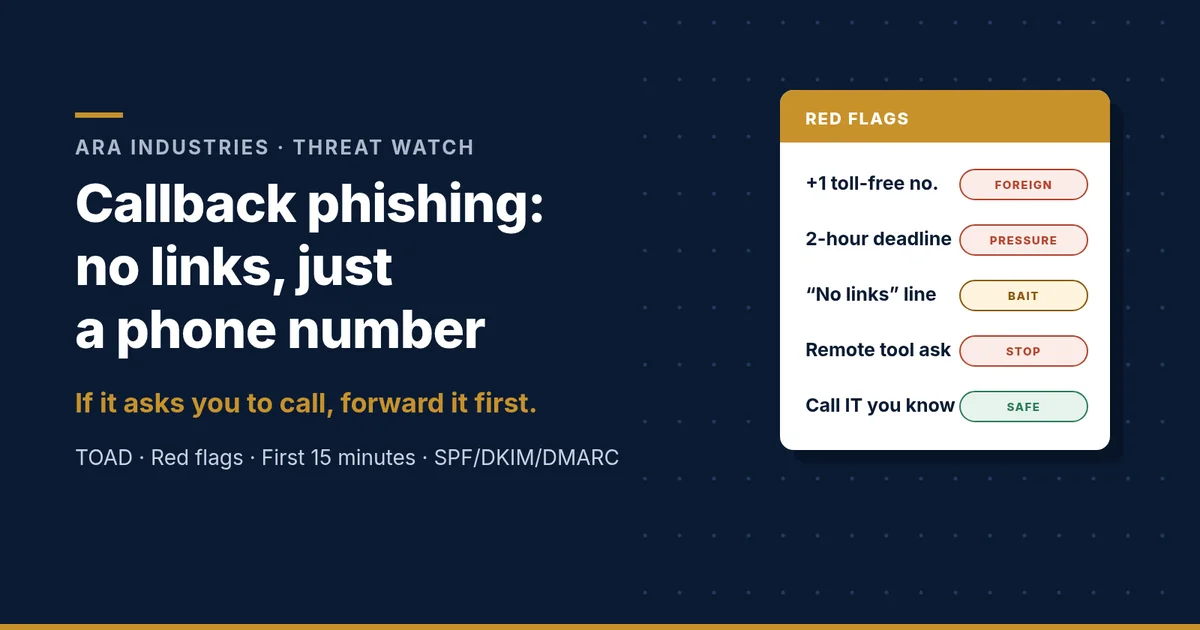
- A foreign or toll-free number on an "internal" IT alert (+1 8XX instead of +63 or an internal extension)
- An impossible deadline ("within 2 hours") plus a threat (suspension, charges, legal action)
- A "no links" or "this email is safe" line. Real IT teams don't advertise this.
- Unfilled placeholders like "[Company Name]", or a generic "IT Security Team" signature
- A "noreply" sender that still expects you to act
- A sender that appears to be your own domain, but the alert doesn't match any tool your IT team uses
- Unexpected invoices or renewals (antivirus, streaming, software) asking you to "call to cancel"
- Any request on the call to install AnyDesk, Zoho Assist, TeamViewer or similar, or to read out a code
Tick even one box and you should stop and check before doing anything else.
What to do in the first 15 minutes
If you received it and did NOT call:
- Don't call, reply or forward it to colleagues "for awareness".
- Report it to IT or your security partner. Use the Report Phishing button if you have one.
- IT should then search all mailboxes for the same message and remove it.
If someone DID call:
- Minute 0–2: Hang up. Disconnect the device from Wi-Fi or the network cable. Don't shut it down, because investigators may need what's in memory.
- Minute 2–5: Call IT or your security partner on a number you already know, never the one in the email.
- Minute 5–10: From a different, clean device, change the passwords for email and anything mentioned on the call. Revoke active sessions and reset MFA if a code was shared.
- Minute 10–15: Write down what happened: the time of the call, the number, what was installed, and what was said or typed. Remove any remote-access tool that was installed. If money or bank details were involved, call your bank right away.
- Report it: In the Philippines, call CICC Hotline 1326 or contact the PNP Anti-Cybercrime Group. Report the number to your telco as well.
- Check your privacy duties: if the caller got into a device or mailbox holding customer or employee personal data, treat it as a possible personal data breach. Under the Data Privacy Act (RA 10173) and NPC Circular 16-03, a notifiable breach must be reported to the NPC and affected people within 72 hours of discovery.
Stop the "it came from our own domain" trick: SPF, DKIM, DMARC in plain words
- SPF is your guest list. It names the servers allowed to send email for your domain.
- DKIM is a tamper-proof seal. It signs each email so receivers can tell it really came from you and wasn't changed on the way.
- DMARC is the house rule. It tells receivers what to do when an email fails those checks: watch (
p=none), send to spam (p=quarantine) or block (p=reject). Start withnoneand read the reports, then move toquarantineand finallyreject.
Google Workspace: Turn on DKIM signing (Admin console → Apps → Gmail → Authenticate email). Under Safety, enable the spoofing and authentication protections, including "inbound emails spoofing your domain". Show the external-sender warning banner.
Microsoft 365: In Defender, enable anti-spoofing and spoof intelligence in the anti-phishing policy. Turn on DKIM for your custom domain, apply first-contact safety tips and external-sender tagging, and give staff the Report button.
Menu labels move around between console updates. If you can’t find a setting, search for it by name in the admin console.
Why this matters to top management
Callback phishing goes after people, not firewalls. It works best when an employee is alone, under pressure and unsure who to ask. Faster technology helps less here than a faster answer to the question "is this real?"
That's the value of a cybersecurity partner who is one email or one call away. In our client's case, the gap between "suspicious email" and "confirmed scam with an action plan" was a single forward. Nobody guessed, nobody called the number, and their IT contact knew exactly what to check next.
As a registered WithSecure partner, ARA Industries combines endpoint protection and detection with people who answer quickly when something looks wrong.
Your next step
- Share the red-flag checklist with your team this week.
- Check your domain's SPF, DKIM and DMARC records, or ask us to check them for you.
- Set your team's rule: if it asks you to call, forward it first.
Got a suspicious email right now? Forward it to securenow@ara.ph and ARA Industries will tell you whether it’s real. For a wider look at how attackers work on staff, read why social engineering succeeds in professional environments, or talk to us about awareness training and endpoint protection.
Frequently asked questions
What is callback phishing (TOAD)?
It is a phishing email that contains no link or attachment, only a phone number. The attack happens on the call, where a fake support agent asks you to install a remote-access tool, share a one-time code or “verify” your login.
Why do callback phishing emails get past spam filters?
Filters are built to inspect links and attachments. A phone number written as plain text gives them very little to block, which is why the scammers advertise that the email has no links.
What should I do if I already called the number?
Hang up, disconnect the device from the network without shutting it down, and call IT on a number you already know. Change passwords from a clean device, revoke sessions, remove any remote-access tool, call your bank if money was involved, and report to CICC Hotline 1326.
Is a callback phishing incident a data breach under the Data Privacy Act?
It can be. If the caller reached a device or mailbox holding personal data, assess it as a possible personal data breach. Under RA 10173 and NPC Circular 16-03, a notifiable breach must be reported to the NPC and affected people within 72 hours.
How do SPF, DKIM and DMARC help against callback phishing?
They stop attackers from sending email that pretends to come from your own domain. SPF lists allowed senders, DKIM signs each message, and DMARC tells receivers to quarantine or reject mail that fails those checks.