Your Agency Holds More Than Résumés. Here’s How to Protect It This Month.
If you run a recruitment or manpower agency in the Philippines, you probably think of your files as paperwork. Applicants bring documents, your team checks them, and the folder moves along to an employer, a clinic or an embassy.
From a security point of view, that folder is something else. It's one of the most complete identity kits anyone holds on a Filipino worker. And even a small office builds up a lot of them over the years.
We're not writing this to scare anyone. Most agency owners care a lot about their applicants. The problem is that the files grew faster than the habits around them. The good news is that the fixes don't need a big budget or a new IT department. They need a few decisions and a month of steady work.
What's actually in the folder
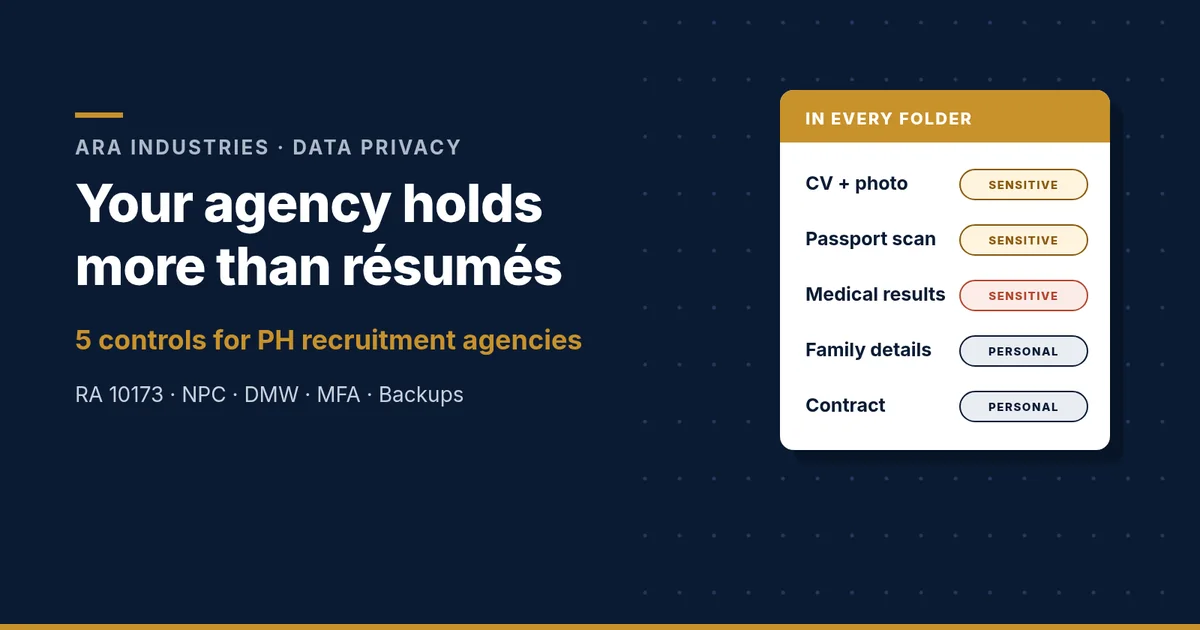
Think about one applicant's file from start to deployment. It typically includes:
- A CV, often with age, marital status, religion, a home address and a photo
- A passport scan, plus other government IDs and clearances
- Medical results and vaccination records from pre-employment exams
- Education records: diplomas, transcripts, certificates
- Family details: emergency contacts, next of kin, sometimes beneficiaries
- The contract and job offer, with salary and employer details
Then multiply that by every applicant in your database, including the ones who never deployed and the ones from five years ago.
Here's the part many owners don't realize. Under the Data Privacy Act of 2012 (RA 10173), a lot of this is sensitive personal information, not just "personal data." The law's definition covers age, marital status and religious affiliation, health and education records, and identifiers issued by government agencies. In other words, a normal CV and medical folder already fall into the law's stricter category.
Why it matters, beyond compliance
Start with your applicants. A passport scan, a medical result and a phone number together are everything a scammer needs. They can pose as your agency, send a "processing fee" request, or offer a fake placement. The person who gets hurt is someone who trusted you with their papers.
Then there's your business. If ransomware locks your shared drive, deployments stop. You can't send documents to principals, answer applicants or prove what you submitted. Attackers know what these files are worth, and they don't skip a business because it's small.
The rules also expect more from you than many agencies assume:
- Registration with the NPC. Under NPC Circular 2022-04, you must register your data processing systems if you employ 250 or more people, or if you process sensitive personal information of 1,000 or more individuals. You may only have 30 staff, but your applicant count is the number that matters.
- Breach notification. NPC Circular 16-03 requires you to notify the National Privacy Commission, and affected people, within 72 hours of knowing or reasonably believing a notifiable breach has happened. Copies of ID documents count as information that can enable identity fraud.
- Security basics are spelled out. NPC Circular 2023-06, which replaced the older Circular 16-01 and now covers the private sector too, lists expectations like need-to-know access, multi-factor authentication for online access to sensitive data, a documented retention policy, encryption for files carried on USB drives, and a business continuity plan that covers backup and restoration.
None of this means you need a compliance team. It means the basics have to actually be done.
Five controls a 30-seat agency can put in place this month
Here's what we'd do if we walked into a typical agency office tomorrow. Each one is realistic for a small team in four weeks.
1. Map where applicant data lives, then cut what you don't need
Who: your Data Protection Officer (or whoever you designate) with your operations head. Time: one afternoon, then a week of cleanup.
List every place applicant files sit: the shared drive, email inboxes, the applicant database or recruitment software, filing cabinets, and, honestly, staff phones and chat apps. Then decide how long you keep each type of record and write it down. Circular 2023-06 expects a documented retention policy anyway. Archive or securely delete the files of applicants who never deployed and whose records you no longer need. Shred old paper copies instead of throwing them out. The safest file is the one you no longer have.
2. Lock down every login
Who: your IT person or outside provider. Time: a week.
Turn on multi-factor authentication for email, cloud storage, your applicant database and any admin account. Use an authenticator app or a passkey where you can, rather than SMS codes. Remove accounts for staff who have left, and stop sharing one login across a team, so you know who opened what. If a single stolen password can open your whole applicant database, fix that first.
3. Give access on a need-to-know basis, and get files out of chat apps
Who: the DPO with each team lead. Time: a week.
Not everyone needs everything. The front desk may need CVs. The documentation team may need passports. Very few people need medical results. Set folder permissions by role. Then agree on one approved way to send documents to principals and partners, such as an expiring share link from your company drive, instead of attachments forwarded through personal messaging accounts. If staff must use USB drives, encrypt the files on them. For paper files, a simple sign-out log shows who took which folder and when.
4. Make sure you can recover, and protect every computer
Who: your IT person or provider. Time: two weeks.
Keep at least one backup copy that ransomware can't reach: offline, or immutable so it can't be changed or deleted from your network. Then test it by restoring a real folder. A backup you've never restored is a hope, not a plan. Our 2026 ransomware snapshot shows why small offices are on the list. At the same time, put endpoint protection with detection and response on every laptop and desktop, keep Windows and your software updated, and make sure lost company phones can be wiped remotely.
5. Write a one-page breach plan and brief your team
Who: the owner and the DPO. Time: two hours to write, 30 minutes to brief.
Name your breach response team, including at least one person who can make decisions on the spot. Circular 16-03 asks for exactly that. Write down who calls your IT provider, who decides whether to disconnect systems, who prepares the NPC notification, and how you'll contact affected applicants. Print it, because your shared drive may be the thing that's down. Then spend 30 minutes with staff on the basics: how fake "applicant" emails and fake principal requests look, and why every payment or document request gets checked through a second channel.
Start small, but start this month
Recruitment agency data privacy isn't a one-time project, and you don't have to fix everything at once. Map the data, lock the logins, tighten access, make sure you can recover, and know who does what on a bad day. Do those five, and you've protected the people who trusted you with their papers, and the license your business runs on.
ARA Industries provides IT business solutions and cybersecurity for teams without their own security staff, and we're a registered WithSecure partner. Want a second pair of eyes on your agency's setup? Start with a cyber health check, email securenow@ara.ph if you think applicant data is already exposed, or usap tayo. No pressure, just a conversation.
This article is general guidance, not legal advice. For questions about your specific obligations, check with the National Privacy Commission, the DMW or your own counsel.
Frequently asked questions
Is applicant data sensitive personal information under the Data Privacy Act?
Much of it is. RA 10173 Sec. 3(l) covers age, marital status, religious affiliation, health and education records, and government-issued identifiers, which are standard in a CV, passport copy and medical file.
Does a small recruitment agency need to register with the NPC?
Possibly, even with few staff. Under NPC Circular 2022-04, registration is required if you employ 250 or more people or process sensitive personal information of 1,000 or more individuals. For agencies, the applicant count usually decides it.
How fast must an agency report a data breach?
Under NPC Circular 16-03, a notifiable breach must be reported to the NPC and to affected people within 72 hours of knowing or reasonably believing it happened. Copies of ID documents count as data that can enable identity fraud.