Ransomware claims are surging in the Philippines. Size won’t save you.
If you run a small or mid-sized business in the Philippines, it’s easy to assume ransomware is a big-company problem. The latest numbers say otherwise, and the reason is worth understanding.
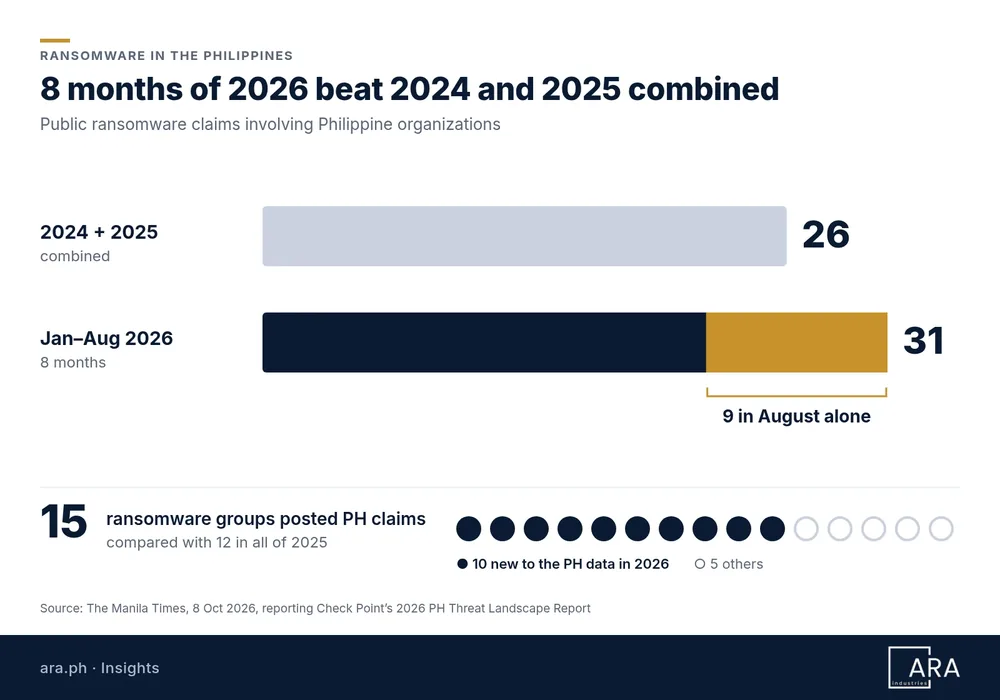
The Manila Times reported on 8 October 2026 on Check Point Exposure Management’s 2026 Philippine Threat Landscape Report. Check Point tracked 31 public ransomware claims involving Philippine organizations from January to August 2026, against 26 for all of 2024 and 2025 combined. Nine of those claims came in August alone.
I’m not sharing this to alarm anyone. I’m sharing it because the report also explains how these attacks happen, and most of that is fixable.
What the report found
According to the Manila Times story on Check Point’s findings:
- More groups are active here. 15 ransomware groups posted claims involving Philippine organizations, compared with 12 in all of 2025. Ten of them appeared in the local data for the first time in 2026.
- One group led, but didn’t dominate. Qilin accounted for 9 of the 31 claims, and its share of local claims rose from 23% to 29%.
- No single sector is the target. Finance and Business Services had six claims each, followed by Retail with five.
- Low volume, fast growth. The Philippines ranked 10th of 11 monitored Asia-Pacific markets by claim volume. But the local increase was faster than the global trend.
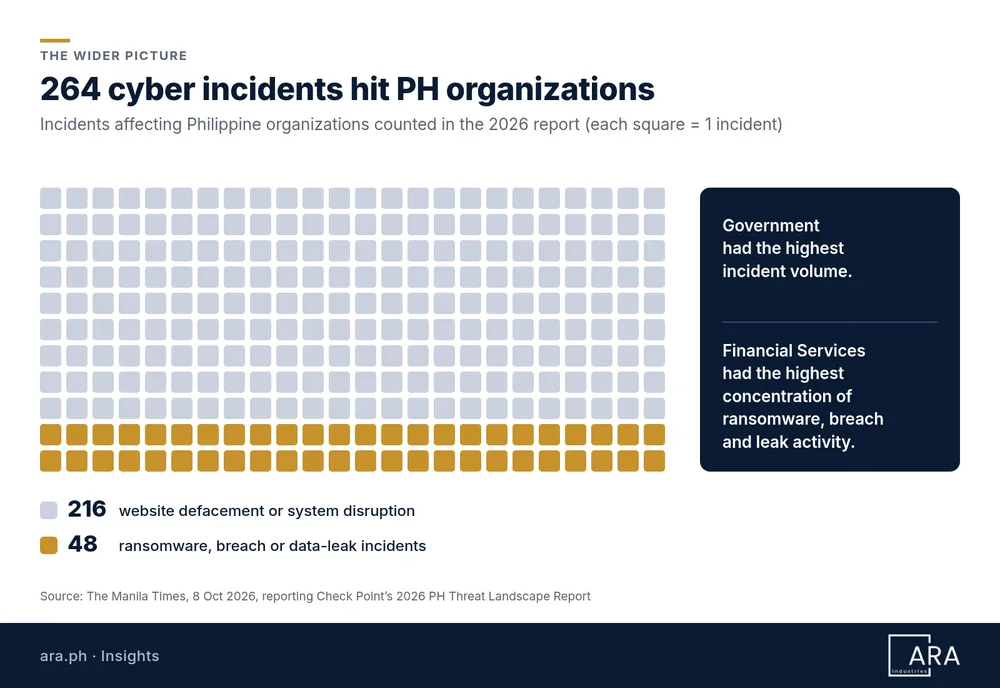
- The wider picture. Check Point counted 264 cyber incidents affecting Philippine organizations. 216 were website defacement or system disruption; 48 were ransomware, breach or data-leak incidents. Government had the highest incident volume, and Financial Services had the highest concentration of ransomware, breach and leak activity.
Check Point attributed the increase to broader participation and the use of pre-positioned access and commoditized intrusion pipelines, not new attack techniques. In plain terms: more people are using the same well-known methods.
Size won’t save you
The line in the report I’d underline for every business owner is this: targeting “remained opportunistic rather than sector-selective.”
Opportunistic means attackers aren’t working down a list of the biggest companies. They’re looking for a door that’s open: an unpatched remote-access device, a reused password, a website plugin nobody updated. If yours is the open door, your size doesn’t matter.
That’s actually good news for an SME. You don’t need to out-spend a bank. You need to stop being the easy option.
Credentials are the new cash
The report recorded 24,875 cases of exposed data among monitored Philippine organizations. Customer credentials made up 41.9% of those cases, ahead of payment card data at 23.6%.
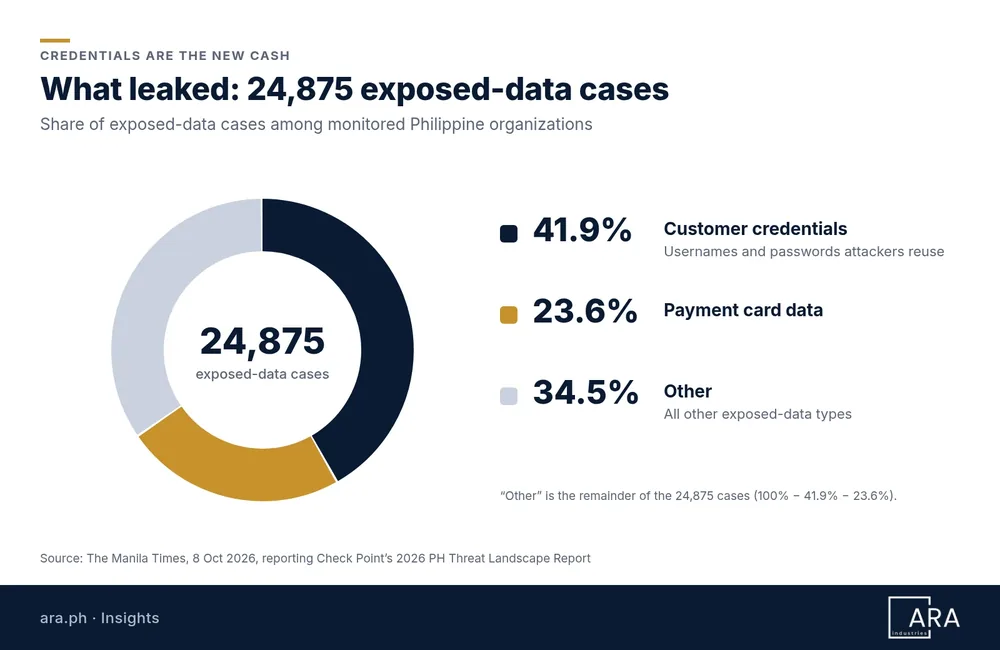
Logins are what attackers trade and reuse, because a working username and password often gets them in without breaking anything. That’s why the report’s recommendation to “continuously address identity and session exposure” matters so much. It isn’t a one-time password reset. It’s an ongoing habit.
AI vs AI: what’s actually happening
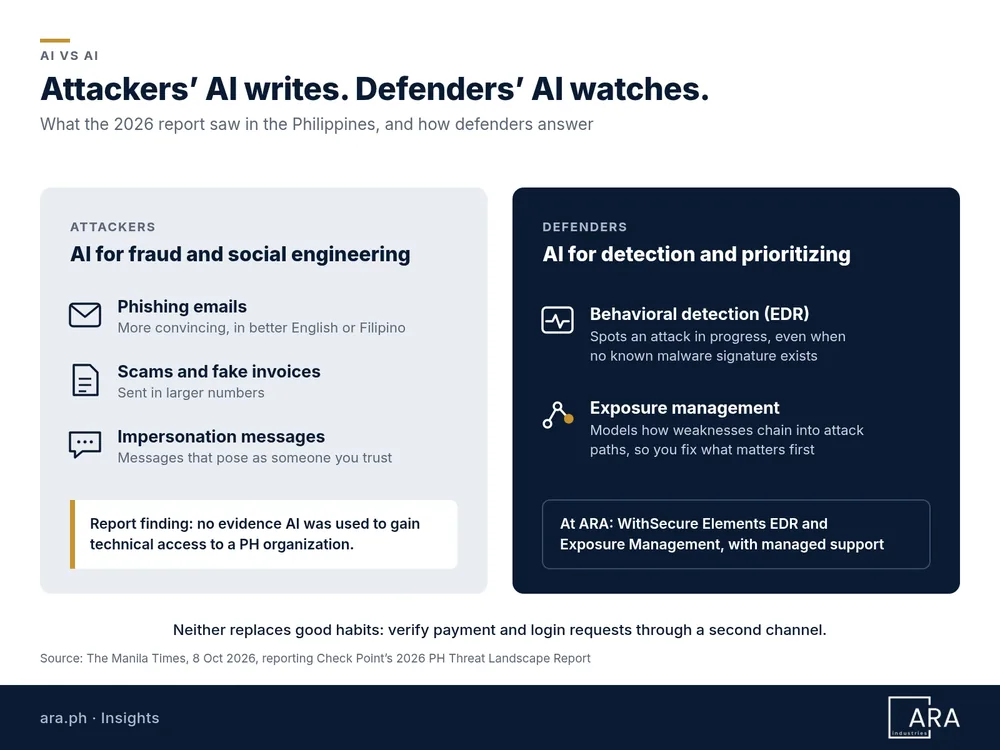
There’s a lot of noise about AI-powered hacking, so let’s stay with the evidence. Check Point found no evidence that AI was used to gain technical access to a Philippine organization during the period. AI’s observed local role was mainly in fraud and social engineering.
So for now, the attacker’s AI is writing. It helps produce more convincing phishing emails, fake invoices and impersonation messages, in better English or Filipino, and in larger numbers. That’s a people-and-process problem first: verify payment and login requests through a second channel, and slow down on anything urgent.
Defenders use AI too, in a different way. Modern endpoint detection uses behavioral analysis to spot an attack in progress even when no known malware signature exists. Exposure management tools model how an attacker could chain weaknesses together, and help you decide what to fix first. Neither one replaces good habits. They help a small team see more, sooner.
Six practical steps for Philippine SMEs
The report’s recommendations are written for organizations of all sizes. Here’s how I’d translate them for a smaller business, and where the tools we use at ARA Industries fit.
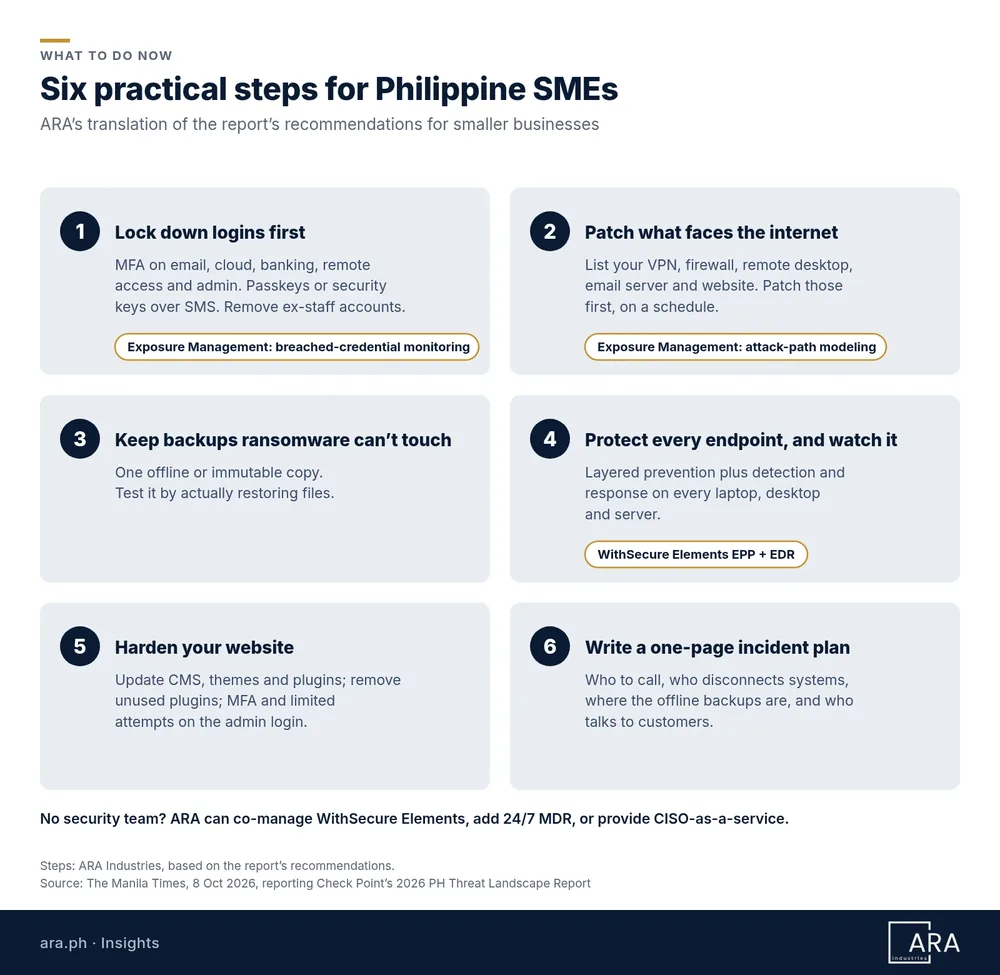
1. Lock down logins first
Turn on multi-factor authentication for email, cloud apps, banking, remote access and admin accounts. Where you can, use phishing-resistant options such as passkeys or security keys instead of SMS codes. Remove accounts for people who have left.
You also need to know when a login has already leaked. WithSecure Elements Exposure Management connects to Microsoft Entra ID, flags overprivileged accounts and continuously monitors for breached credentials. That’s one practical way to “continuously address identity and session exposure.”
2. Patch what faces the internet
Make a list of everything reachable from outside: VPN, firewall, remote desktop, email server, website. Patch those first and on a schedule. This is how you “reduce exposure along common intrusion paths,” in the report’s words.
Most SMEs don’t have a complete list. Elements Exposure Management continuously maps internet-facing systems, web applications and public IPs, so you see roughly what an attacker sees. Its attack path simulation then points to the fixes that break the most dangerous routes in, which helps when you can’t patch everything this week.
3. Keep backups ransomware can’t touch
Keep at least one backup copy offline or immutable (it can’t be changed or deleted from your network). Then test it by actually restoring files. A backup you’ve never restored is a hope, not a plan.
4. Protect every endpoint, and watch it
Laptops and desktops are where ransomware runs. WithSecure Elements Endpoint Protection (EPP) covers Windows, macOS and Linux with layered prevention. That includes DataGuard, which is built to block ransomware from encrypting files, and Rollback, which reverts file and registry changes made by ransomware. It also handles operating system and third-party patching through Software Updater, which supports step 2.
Prevention alone isn’t enough. Elements Endpoint Detection and Response (EDR) looks for advanced threats that get past prevention. It groups related alerts into one incident with an attack timeline, so you aren’t left with a pile of disconnected warnings. You can isolate a device or quarantine a file quickly, and get plain-language guidance on what to do next. Rollback still doesn’t replace the tested offline backup in step 3.
5. Harden your website
With defacement and disruption making up most of the incidents Check Point counted, your website deserves attention. Keep your CMS, themes and plugins updated, remove unused plugins, protect the admin login with MFA and limited attempts, and don’t share admin accounts.
6. Write a one-page incident response plan
Decide now who to call, who can disconnect systems, where the offline backups are, and who talks to customers. The report urges organizations to “turn threat intelligence into defined response actions.” For an SME, that starts with a page everyone can find.
Don’t forget vendors and AI tools
Two more recommendations from the report apply to businesses of any size. Third-party governance: know which suppliers, IT providers and agencies have access to your systems, give them only what they need, and require MFA. AI governance: decide which AI tools staff may use, what data must never go into them, and who approves new ones.
No security team? You don’t have to do this alone
Most SMEs I talk to have one IT person, or an outside provider, or the owner doing it after hours. Tools only help if someone acts on what they show.
That’s where managed support comes in. Through ARA Industries you can run WithSecure Elements yourself, have us co-manage it, or hand more of it to us. We help with setup, tuning and day-to-day support. If you need eyes on the console around the clock, we can add WithSecure’s 24/7 Managed Detection and Response, where WithSecure analysts monitor, investigate and respond using Elements EDR data.
For the bigger picture, our CISO-as-a-service work turns the report’s last recommendation into something real: a short list of agreed response actions, owners and review dates for your business.
Your quick checklist
- MFA on email, cloud, banking, remote access and admin accounts
- Former staff and unused accounts removed
- Leaked-credential and identity exposure monitored, not checked once
- Internet-facing systems listed and patched
- One offline or immutable backup, restore-tested this quarter
- Endpoint protection with EDR on every laptop, desktop and server
- Website CMS and plugins updated; admin login protected
- Vendor access reviewed and limited
- AI-use rules written down; staff verify payment requests by a second channel
- One-page incident response plan printed and shared, with a named person watching alerts
Focus on impact, not headlines
The report’s first recommendation is to prioritize potential business impact over incident volume. I’d say the same: don’t try to fix everything at once. Ask which systems would stop your business if they went down for a week, and protect those first.
If you’d like a second pair of eyes, usap tayo. We can do a short call or a security assessment to find your open doors and agree on what to fix first.
Source: The Manila Times, “Ransomware claims surge in PH,” Jing Garcia, 8 October 2026, reporting Check Point Exposure Management’s 2026 Philippine Threat Landscape Report.
Frequently asked questions
How many ransomware claims hit Philippine organizations in 2026?
Check Point tracked 31 public ransomware claims involving Philippine organizations from January to August 2026, against 26 for all of 2024 and 2025 combined, as reported by The Manila Times on 8 October 2026.
Are small businesses in the Philippines targeted by ransomware?
Yes. The report found targeting remained opportunistic rather than sector-selective. Attackers look for an open door, such as an unpatched remote-access device or a reused password, so company size does not protect you.
What should a Philippine SME do first to reduce ransomware risk?
Turn on multi-factor authentication for email, cloud apps, banking, remote access and admin accounts, then patch internet-facing systems, keep one offline or immutable backup that has been restore-tested, run endpoint protection with EDR, harden the website, and write a one-page incident response plan.
Is AI being used to hack Philippine organizations?
Check Point found no evidence that AI was used to gain technical access to a Philippine organization during the period. AI's observed local role was mainly in fraud and social engineering, such as more convincing phishing emails and fake invoices.